
Understanding gamma correction — why your eyes & LEDs see light differently

“Why have you given two different programs to make an LED glow and fade?”
We received a message on our instagram handle from the parent of 12 year old Navya.
And we were happy. We are happy when we receive genuine questions from kids, parents and teachers. Your curiosity is our motivation!
Then we received an email from a user reporting that one of our two LED fade programs was not functioning smoothly and was exhibiting some jerkiness.
WOW! People are implementing and we are making an impact.
So, have you tried to make an LED glow and fade softly using your havi controller and elements? Yes, talking about “Fading the LED with an Array” program provided in LED projects using microcontroller.
Have you noticed that it doesn’t fade smoothly?
If you observe closely you can observe the brightness changing in small steps. It’s not happening smoothly, like a sunrise or sunset.
Is the program wrong? No, You’re not doing anything wrong.
It’s not your LED’s fault either.
It’s your little beautiful eyes — your eyes hold the secret. ️
Let’s uncover biology, psychophysics and programming – all together.
The secret of our eyes
Imagine you’re in a dark room with a candle. If you light one more candle, the room suddenly feels much brighter. But how much? Double the brighter?
Not really.
Now see the room through the “eyes” of a camera. For camera, yes, it’s double the brighter.
Now, what if you already have ten candles burning, and you add one more… meh, your eyes barely notice the difference.
That’s because your eyes are more sensitive in the dark and lazy in the bright.
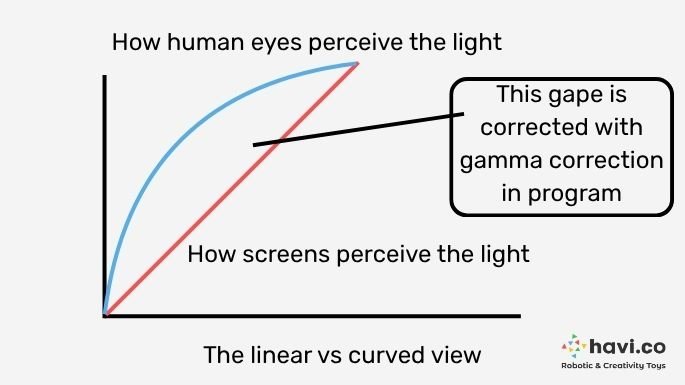
They don’t see light in a straight line like a camera does.
So even if you double the light, your brain doesn’t think, “Oh, it’s twice as bright!”
It just says, “Hmm… a little brighter, maybe.”

Scientists Gustav Fechner and Ernst Weber figured this out more than 150 years ago — long before computers or LEDs existed!
They discovered that our sense of brightness grows in a curve, not a straight line.
People might be thinking this understanding of biology is of little use, but it turned super important when humans started building screens.
When Computers Met LEDs
Computers are simple-minded.
When you write this python code in Havi controller:
led.duty(512)
they think — “Oh, 512 is half of 1023, so that’s half brightness.”
But your eyes disagree.
They say, “Nope! That looks more like quarter brightness!”
That’s because computers deal in linear numbers, while your eyes see nonlinear light.
| Duty Cycle (%) | What computer thinks | What your eyes see |
| 10% | A little bright | Barely visible |
| 50% | Half bright | Still quite dim |
| 90% | Very bright | Almost full bright |
So when you try to fade an LED from 0 to 100% by increasing the duty cycle slowly, our eyes don’t feel smooth — it’s dark for a long time, then suddenly bright.
We need a trick to make the LED brightness match how we actually see light.
Gamma Correction! — For your eyes only!
Imagine you’re explaining to your computer:
“Hey buddy, when I say half brightness, I don’t mean 512 — I mean something that looks like half brightness to me, not to you!”
To do that, we use a simple mathematical spell called the gamma formula:
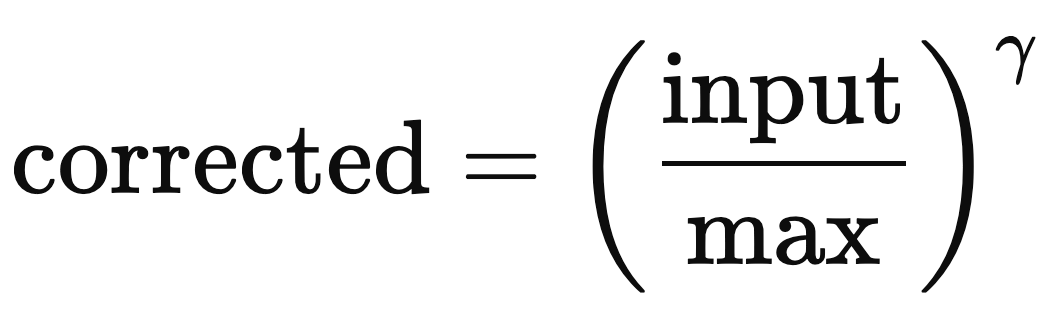
Here’s what happens:
- First, your LED brightness value (say 512) is divided by the max (1023), so it becomes 0.5.
- Then, it’s raised to a power called gamma (γ) — usually around 2.2.
- Finally, it’s scaled back to the 0–1023 range.
That’s it!
You just taught your LED how humans actually see brightness.
And that’s why, Navya, now you know why there are two different programs to make the LED fade.
Fading the LED with an Array: This program uses linear increment. So our eyes don’t see the transition well.
LED Fading effect with gamma correction: This program uses gamma correction, hence our eyes see the glow smooth.
What is Gamma Correction?
Gamma correction is like a translator between your eyes and your computer.
It teaches your code how humans see brightness.
Gamma correction value is normally 2.2. Sometimes scientists use 2.4 and 2.6 too for different purposes. But 2.2 is great for us.
Gamma correction program with python and microcontroller
Now that you know why gamma correction is needed and the equation for the same, here is the python program again, which you can write and execute on Havi controller.
import time
import math# Initialize 4 variable PWM outputs (duty cycle from 0 to 1023)
leds = [
ports.variable_output1(),
ports.variable_output2(),
ports.variable_output3(),
ports.variable_output4()
]# Fade parameters
STEP = 20 # Step size for brightness (0–1023)
DELAY = 0.07 # Delay between steps in seconds
MAX_DUTY = 1023
GAMMA = 2.2 # Common gamma value for perceived brightness# Gamma correction function
def gamma_correct(duty_raw, gamma=GAMMA):
# Normalize (0–1023) → (0–1), apply gamma, then scale back to (0–1023)
normalized = duty_raw / MAX_DUTY
corrected = math.pow(normalized, gamma)
return int(corrected * MAX_DUTY)# Set all LEDs to a specific brightness
def set_all_leds(duty_raw):
corrected = gamma_correct(duty_raw)
for led in leds:
led.duty(corrected)
print(f”Raw Duty: {duty_raw} → Corrected: {corrected}”)# Fade in and out loop
try:
while True:
# Fade in
for duty in range(0, MAX_DUTY + 1, STEP):
set_all_leds(duty)
time.sleep(DELAY)time.sleep(1) # Hold at full brightness# Fade out
for duty in range(MAX_DUTY, -1, -STEP):
set_all_leds(duty)
time.sleep(DELAY)time.sleep(1) # Hold offexcept KeyboardInterrupt:
print(“nInterrupted. Turning off LEDs…”)
set_all_leds(0)
When you see the printed output, you’ll see smaller values become larger after correction — because your eyes need more light to notice the change at low brightness levels.
Now, if you use these corrected values to fade your LED, you’ll see a beautiful, smooth glow — the kind you see in real screens!
What’s Happening Behind the Scenes?
Back in the old days, televisions used CRT screens (those big, boxy ones your grandparents might remember).
CRTs naturally followed a gamma curve of around 2.2 — so images looked perfect without any correction!
But modern screens like LED, LCD, and OLED are linear.
That means they need this gamma correction built into their software or graphics card to look natural.
So every time you watch a video, view a photo, or play a game — gamma correction is secretly working in the background to make everything look nice.
Where else is Gamma correction used?
- On your phone and TV screens
- In photo editing software
- In video games
Even in robotics and other DIY projects, when you control lights, sensors, or displays!
What You Learned Today
- Your eyes don’t see light in a straight line but curve.
- Computers think linearly.
- Gamma correction bridges the gap between machines and human vision.
- The magic number γ ≈ 2.2 makes brightness appear smooth and natural.
So the next time your when you turn the TV on, or adjust the brightness of your tablet, or deal with any screen and it glows perfectly smooth — smile and think:
“That’s gamma correction — and I know its secret!”
Do you think this beautiful science should be known to others too? Share the link with your friends and known-ones over any of the social channels.