
How to make a pushup counter using python and Havi Controller

Regular exercise helps the body stay strong, active, and healthy.
Simple movements like stretching, jumping, or doing push-ups improve strength, balance, and energy. Exercise also helps children feel more focused, sleep better, and build confidence over time. When physical activity becomes a part of daily life, it supports both physical well-being and a positive mindset.
The push-up counter senses when someone moves down and pushes back up, observing the motion without getting in the way. There are no buttons to press or numbers to remember, just simple movement and steady progress. Each completed push-up is noticed and counted, making the exercise feel smooth and uninterrupted.
This simple system makes exercising easier and more enjoyable. Instead of worrying about counting in your head, you can focus on your movement and your strength. It helps children stay motivated, parents track progress, and families turn exercise into a shared activity. With every push-up, the counter encourages consistency, confidence, and healthy habits, making fitness feel fun, achievable, and rewarding.
In this blog, we are going to make a pushup counter system, using the IR Element, Havi controller (an esp32 based microcontroller, more powerful than arduino) and Python code. Get all the components from Havi DIY Robotics starter kit and Havi advanced robotics kit add-on. Or you can contact us to get these project-specific components.
Let’s start.
Things you need to make a pushup counter
Elements:
- Havi Controller
- IR Element
- Buzzer Element
Accessories:
- Power bank with USB Cable – 2
- Data cable
- 3-pin cable
For programming:
- Laptop/computer with active internet connection
- Havi MicoPy
- Mobile phone(optional)
How to make a pushup counter
Step 1
First, let’s make the circuit.
Snap IR Element at input 1 port of Havi Controller. Snap Buzzer Element at output 1 port of Havi Controller.

Step 2
Connect the Havi Controller to the laptop/desktop using data cable & connect the power bank with the Havi Controller using USB cable.
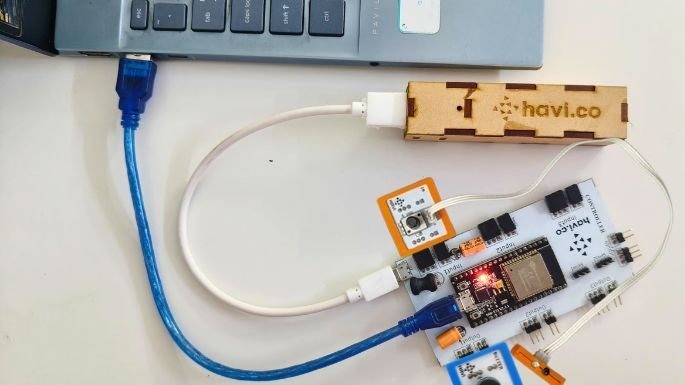
Step 3
Open your web browser and search for Havi MicoPy. Connect your Havi Controller with Havi MicoPy.
Step 4
Once Havi Controller is connected with Havi MicoPy, paste the code for pushup counter in the main.py file.
Download the python code by clicking on the following button.
Step 5
Once you paste the code to the main.py file, change the wi-fi settings as per your wi-fi.

Step 6
Run the code. The following should be displayed in the terminal, then open the generated server address in a new tab.

Step 7
Once the web server tab will open, the count will automatically start at 0.

To test, keep your hand near the IR LED and see the count will increase by 1 and buzzer will beep. Watch the following video.
Your pushup counter is ready. Use another power bank with the controller to make the device free from laptop/computer. Now, copy the web address and paste it into the browser on your smart phone. The phone should be connected with the same wi-fi.
Tada… you can display the pushup counts on your phone.
Now, set your posture and start doing pushups.
To reuse or log a new count, press the EN button on the controller.
This way, you can make your own exercise tracker using Havi’s advanced robotics kit add-on.