Smart dustbin project – step by step guide
Have you ever noticed how people hesitate to open the dustbin lid because it’s dirty and sticky?
And how does the foot pedal dustbin work only for a few days and then the pedal stops functioning?
This problem is common at home, in schools, playgrounds, and public places where many people use the same bin. Since no one likes touching dirty lids, waste often ends up being thrown near the dustbin instead of inside it. This leads to an unhygienic environment and unnecessary mess.
A smart dustbin solves this problem using technology. Here in this blog we have explained the technology and the step by step making process with photos and videos to make a smart dustbin project yourself at home or school. You also get the downloadable python code.
What is a smart dustbin?
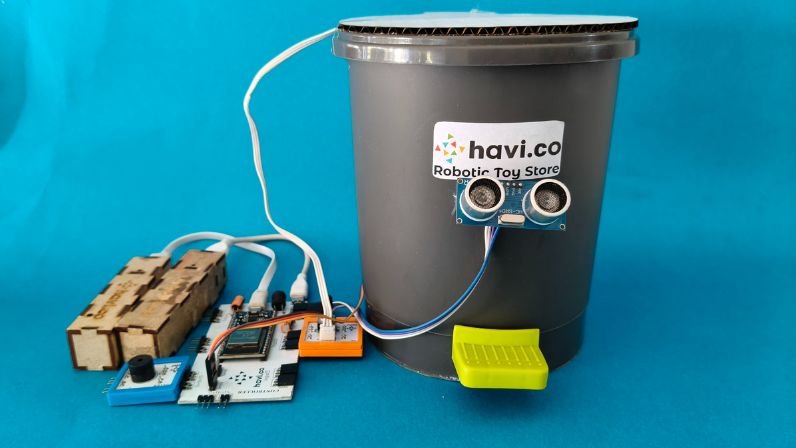
A smart dustbin (automatic dustbin) opens its lid automatically when someone comes near it. It uses an ultrasonic sensor to detect movement and a servo motor to open and close the lid. An IR sensor placed inside the bin checks whether the dustbin is full, and a buzzer alerts about the door movement.
This touchless dustbin project is clean, hygienic, and easy to use. It encourages proper waste disposal and helps maintain cleaner surroundings.
Why build a Smart Dustbin?
- Hands-free and hygienic waste disposal
- Best science fair project for students
- Ideal IoT / robotics project for kids
- Demonstrates real-life use of sensors and automation
You can build this automatic smart dustbin project using Havi Robotics kits and present it in school exhibitions.
Things you need to make an automatic dustbin project
Elements:
Havi Controller
IR element pair with 3-pin cable
Buzzer element – 1
Ultrasonic sensor
Servo motor
Accessories
Power bank x 2
Data cable
USB cable
Servo motor mount
Small step on pedal dustbin
Craft material
Card board
Foam board
Cutter/Scissor
Sticky tape
Glue gun
For programming
Computer or laptop
Software: Havi Code – Python webIDE
All of these components can be found in Havi Elements – DIY Robotics Starter Kit + Havi Advanced Robotics Kit Add-on. Or you can request the required components by contacting us.
The making
Step 1
Carefully remove the lid of the dustbin. Ask an adult to help you remove the screws safely.
Step 2
Make a new lid using cardboard according to the size of the dustbin opening.
Cut foam board pieces based on the dustbin dimensions to fix the cardboard lid with the dustbin.

Step 3
Stick the foam board pieces to the cardboard lid using glue.
Make sure the pieces are firmly fixed.


Step 4
Place the prepared cardboard lid on top of the dustbin.
Stick a small cardboard piece at the center of the lid to fix it properly.
Check that the lid is stable and does not move.

Step 5
Turn the dustbin upside down.
Make a servo holder using cardboard of suitable height and stick it parallel to the bottom base of the dustbin.
Fix the servo motor onto the servo holder as shown in the reference image.


Step 6
Prepare the circuit connections as follows:
- Connect the buzzer to output 3 of the Havi Controller
- Connect the IR sensor to input 2 of the Havi Controller
- Connect the ultrasonic sensor to input 1 of the Havi Controller
- Connect the servo motor to servo port 2 of the Havi Controller

Step 7
Connect the Havi Controller to your computer using the correct COM port.
Download the smart dustbin project code by clicking on the following button.
Open Havi Code upload the provided code to main.py.
Test the servo motor movement.
If the servo rotates in the wrong direction, change the direction in the code and reupload main.py.
Step 8
Place the IR sensor LED inside the dustbin to detect whether the bin is full.
Fix the ultrasonic sensor in front of the dustbin to detect a person approaching, as shown in the image.

The smart dustbin is ready.

How does it work?
We have used two sensors in the smart dustbin project. The ultrasonic sensor is used to detect a person or trash at a certain distance. When someone brings trash near the ultrasonic sensor or stands in front of the dustbin, the sensor sends a signal to the servo motor. Servo motor rotates and pushes up the lid through the excel. Hence the lid opens automatically. You can put in the waste, and the lid closes automatically after 5 seconds. Why 5 seconds? Because we have mentioned the same in program. You can change that if required.
The IR sensor is used to detect if there is space for more trash inside the dustbin. When the bin is full and someone comes nearby, the IR sensor informs the same to ultrasonic sensor. In this case, the dustbin does not open, and the buzzer alerts the user about same.

Two questions and one challenge to you.
Question 1: When will the servo start opening the lid again once the bin is full?
Question 2: How a human can know if the dustbin is full without trying to open it?
Hint: you have a blue colored element in your robotics starter kit which can be helpful here.
And a challenge: can you do this modification yourself? Do it and send us across!
–
This way, you can make an automatic dustbin project and solve a real life problem.